Numerous staff members who read last week’s Connection article about cell phone discounts and who contacted U.S. Cellular about those discounts were sent the following message from James Lininger of U.S. Cellular:
We do offer a monthly discount to school employees. However, the information coming from the Iowa Educator Consortium is out of date as it directs individuals to contact me.
The new discount program has two ways to sign up:
• The customer will need to go to www.uscellular.com/partner and fill out your name and your school email address. It will take one to two billing cycles for the discount to take effect.
• If you do not have a school e-mail address or the address comes back invalid, you can call 800-819-9373 and reference discount code PED1008.
• When signing up for the discount you will be required to renew your service agreement for 24 months. This renewal does not change the date for which you will be eligible for new equipment at the discounted price.

Monday, May 18, 2009

Iowa Professional Development Model Technical Guide Now Available
The Iowa Professional Development Model (IPDM) Technical Guide is now available for use. The Technical Guide replaces the original IPDM Training Manual and the IPDM Administrator’s Guide.
The new version of the IPDM Guide includes information on the Student Achievement and Teacher Quality Act (2007) and connections to the Iowa Core Curriculum. Input from Iowa practitioners was used to make the document more concise and useful to district leadership teams.
The DE recommends that local education agency (LEA) administrators, district and school leadership teams, Teacher Quality Committees, area education agency (AEA) administrators and AEA Leadership teams study the IPDM guide and use it as a tool for guiding professional development planning and decision making. The guide will be very beneficial for developing the Iowa Core Curriculum Implementation Plan. This plan includes the outcome “Educators engage in professional development focused on implementing Characteristics of Effective Instruction and demonstrate understanding of Essential Concepts and Skill Sets.”
This guide may be reprinted and posted on Web sites for use in Iowa education programs. The document is also available on the Iowa Department of Education Web site at http://www.iowa.gov/educate/index.php?option=com_content&task=view&id=232&Itemid=1286#pddocuments.
The new version of the IPDM Guide includes information on the Student Achievement and Teacher Quality Act (2007) and connections to the Iowa Core Curriculum. Input from Iowa practitioners was used to make the document more concise and useful to district leadership teams.
The DE recommends that local education agency (LEA) administrators, district and school leadership teams, Teacher Quality Committees, area education agency (AEA) administrators and AEA Leadership teams study the IPDM guide and use it as a tool for guiding professional development planning and decision making. The guide will be very beneficial for developing the Iowa Core Curriculum Implementation Plan. This plan includes the outcome “Educators engage in professional development focused on implementing Characteristics of Effective Instruction and demonstrate understanding of Essential Concepts and Skill Sets.”
This guide may be reprinted and posted on Web sites for use in Iowa education programs. The document is also available on the Iowa Department of Education Web site at http://www.iowa.gov/educate/index.php?option=com_content&task=view&id=232&Itemid=1286#pddocuments.
Technology Update
Reminder: Changes to the Agency File Server
This is an important reminder regarding the Technology Update of April 5, 2009: Important Changes to the Agency File Server. While many people have transferred their files, a lot of people have not. If you have not transferred your files, read the Technology Update at the link above. If you have any questions, please contact Jim Lagnese.
This is an important reminder regarding the Technology Update of April 5, 2009: Important Changes to the Agency File Server. While many people have transferred their files, a lot of people have not. If you have not transferred your files, read the Technology Update at the link above. If you have any questions, please contact Jim Lagnese.
Monday, May 11, 2009
Cell Phone Information Update
Many of you have participated in the Agency’s project to gather information on cell phones in the past few months either by answering a survey or by participating in a cell phone focus group. To all the participants, and to those willing to participate who couldn’t because of prior engagements, the committee wishes to express its thanks to you. Because of your efforts, we have collected substantial and enlightening data around the issue of cell phones. We are now working on a recommendation to take to the Executive Council. Watch for information about this project in future Connections.
As a result of our information gathering, the committee has realized that not all employees are aware of the cell phone discounts available to Heartland employees through the Iowa Educators Consortium (IEC). The IEC offers cell phone discounts to new and existing customers of AT&T, Verizon and U.S. Cellular. Check out the Web site below if you are not already receiving an IEC cell phone discount. http://www.iec-ia.org/vnews/display.v/ART/456315d889200
As a result of our information gathering, the committee has realized that not all employees are aware of the cell phone discounts available to Heartland employees through the Iowa Educators Consortium (IEC). The IEC offers cell phone discounts to new and existing customers of AT&T, Verizon and U.S. Cellular. Check out the Web site below if you are not already receiving an IEC cell phone discount. http://www.iec-ia.org/vnews/display.v/ART/456315d889200
New Work Calendar Entry Function in IFAS Dashboard
A new function has been added to the IFAS Dashboard that will allow staff to create their individual 2009-2010 work calendar. The link to this function is found in the Calendar Online Forms folder on the LeaveOnline tab.
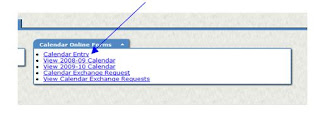 The calendar presented will be the default calendar based on the individual staff member’s pay assignment. This will look very similar to the online Calendar View function. However, functionality is built into the interface to allow the personalization of the calendar to reflect the staff member’s schedule. This is done by simply clicking on the day in question. Each time a day is clicked, it will change to one of the following:
Blue X – represents a non-working day
Green / – represents a half-working day
White Space – represents a full-working day
Unpaid holidays are represented by a yellow H, and paid holidays are represented by a yellow H followed by an asterisk (*). Sundays and holidays cannot be changed.
At the top of the screen two numbers will be presented. The number on the left is the number of working days based on the days selected as such; in other words, the total of the white spaces (full days) and green slashes (half days). The second number is the number of days expected to work based on the pay assignment. These two numbers must match when the calendar is submitted.
A help document named “Calendar Online Entry Documentation” is available on the Help tab on the IFAS Dashboard. This document describes in detail all functions of the interface. When the calendar is submitted, it will be routed to the staff member’s supervisor just as a leave request. And, just as a leave request, the supervisor will review and can approve or reject the calendar. Applicable e-mails are sent to the staff member and their Need-to-Know contact.
Once approved, the 2009-2010 calendar can be viewed by the staff member, the supervisor and the Need-to-Know contact. Also, all subsequent changes to the 2009-2010 calendar must be submitted via the Calendar Exchange Online request system after July 1.
Any questions about the Calendar Online should be sent to Rod Howell at rhowell@aea11.k12.ia.us.
 The calendar presented will be the default calendar based on the individual staff member’s pay assignment. This will look very similar to the online Calendar View function. However, functionality is built into the interface to allow the personalization of the calendar to reflect the staff member’s schedule. This is done by simply clicking on the day in question. Each time a day is clicked, it will change to one of the following:
 Blue X – represents a non-working day
Green / – represents a half-working day
White Space – represents a full-working day
Unpaid holidays are represented by a yellow H, and paid holidays are represented by a yellow H followed by an asterisk (*). Sundays and holidays cannot be changed.
At the top of the screen two numbers will be presented. The number on the left is the number of working days based on the days selected as such; in other words, the total of the white spaces (full days) and green slashes (half days). The second number is the number of days expected to work based on the pay assignment. These two numbers must match when the calendar is submitted.
A help document named “Calendar Online Entry Documentation” is available on the Help tab on the IFAS Dashboard. This document describes in detail all functions of the interface. When the calendar is submitted, it will be routed to the staff member’s supervisor just as a leave request. And, just as a leave request, the supervisor will review and can approve or reject the calendar. Applicable e-mails are sent to the staff member and their Need-to-Know contact.
Once approved, the 2009-2010 calendar can be viewed by the staff member, the supervisor and the Need-to-Know contact. Also, all subsequent changes to the 2009-2010 calendar must be submitted via the Calendar Exchange Online request system after July 1.
Any questions about the Calendar Online should be sent to Rod Howell at rhowell@aea11.k12.ia.us.
May Heartland Board of Directors Meeting Agenda
Click here to download the agenda for the May 12 Heartland Board of Directors meeting.
May Technology Lunch & Learn: Personal Learning Networks
By building your personal learning network (PLN) you can learn from other professionals in your field, hone your skills and implement new techniques in your job. During the session, participants will look at using tools like Delicious and Twitter, as well as review RSS feed, and then take some time to build their own PLNs. Please note, the location has been changed to the Learning Center.
Date: May 13, 2009
Time: 11:30 a.m.-1:00 p.m.
Location: Johnston office Learning Center
Activity Number: IN017292110904
Date: May 13, 2009
Time: 11:30 a.m.-1:00 p.m.
Location: Johnston office Learning Center
Activity Number: IN017292110904
Calling All Wellness-Minded Employees!
Are you interested in fitness, healthy eating, stress relief and wellness in general? If so, you’d be a great fit for the Wellness Team! The Agency will be reestablishing a wellness program this summer, and we need your help. If you are interested in being a member of this important team, please e-mail the Communications Department at comms@aea11.k12.ia.us.
Subscribe to:
Posts (Atom)